
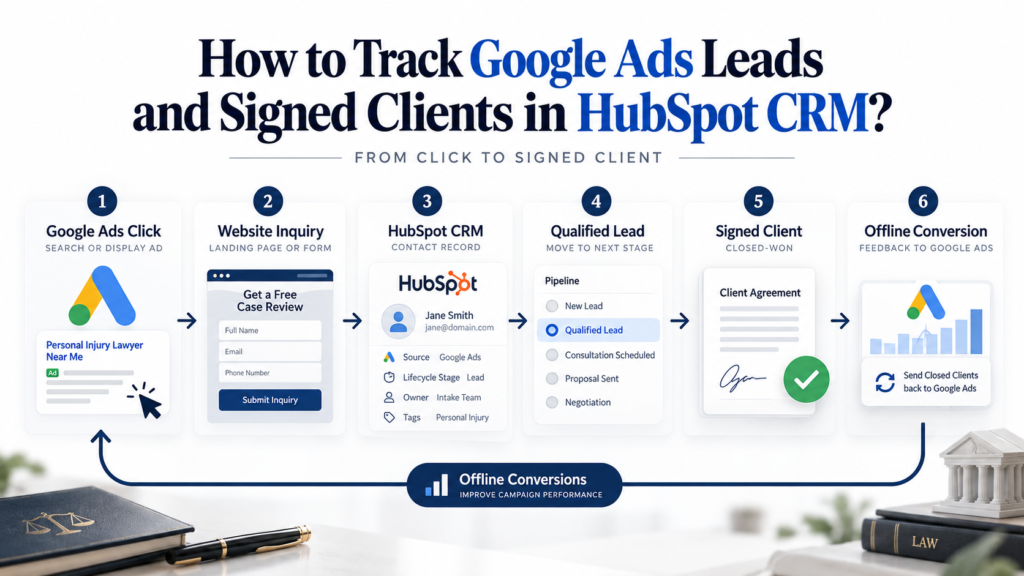
Your law firm may be generating leads through Google Ads, but how many of those inquiries become paying clients?
Law firms can spend thousands on Google Ads each month and pay for leads that never become clients. Google Ads tracks form submissions and calls, but identifying which prospects qualify, attend consultations, or sign retainers requires additional CRM tracking.
Without connecting advertising data to client acquisition outcomes, firms risk scaling campaigns that generate inquiries yet fewer signed cases. At Agilitive Digital, we’ve managed over $10 million in advertising spend exclusively for law firms, focusing on linking marketing performance to meaningful client acquisition outcomes.
Tracking Google Ads leads in HubSpot CRM helps connect ad spend to signed clients.
This guide explains how law firms can integrate Google Ads with HubSpot, capture GCLIDs, track lead qualification, configure offline conversion tracking, and optimize campaigns using meaningful client acquisition data.
Quick Answer
To track Google Ads leads and signed clients in HubSpot CRM, connect your advertising account, capture click identifiers and campaign attribution, and record each lead’s progress through the intake process. Configure CRM conversion events to send eligible, qualified leads and signed-client outcomes back to Google Ads using enhanced conversions for leads. This lets your firm measure which campaigns generate clients, rather than depending solely on form submissions and phone calls.
What Is Google Ads Lead Tracking in HubSpot CRM?
Google Ads lead tracking in HubSpot connects advertising interactions with contact records, intake activities, and client acquisition outcomes inside your CRM. It allows your firm to understand what happened after someone clicked an advertisement.
Consider the typical journey of someone searching for a family law attorney:
- A prospective client clicks a Google Search ad.
- They visit your law firm’s website.
- They complete a consultation request form.
- HubSpot creates or updates their contact record.
- Your intake team reviews the inquiry.
- The lead qualifies for a consultation.
- The prospective client attends the consultation and signs an engagement agreement.
- Your CRM records the outcome and sends an eligible conversion event to Google Ads.
The Difference Between Lead Tracking and Client Attribution
Basic conversion tracking measures an action someone completes on your website, typically a form submission, phone call, or appointment request.
CRM attribution connects that interaction to a business outcome.
HubSpot stores the contact’s original and latest traffic sources, Google ad click ID, campaign information, and lifecycle stage. Your team can add intake status, consultation outcomes, and signed client information. However, HubSpot’s native traffic traffic source attributes and Google Ads attribution differ. HubSpot may recognize a source as Paid Search without preserving every Google Ads campaign detail on the contact record.
This is why reliable attribution requires both HubSpot’s native properties and properly configured first-party tracking. The key distinction is that HubSpot records what happened to the lead, while Google Ads uses eligible conversion information to attribute and optimize advertising.
When configured correctly, the two systems provide a much clearer picture of which advertising investments contribute to client acquisition.
Why Tracking Google Ads Leads in HubSpot Matters for Law Firms?
1. Poor Intake Visibility Makes Advertising Results Misleading
Law firms have a persistent client intake problem. Clio’s 2024 Legal Trends research included a secret shopper study of 500 law firms. Only 40% answered phone inquiries, and just 33% responded to email inquiries. The findings show how often prospective clients struggle to connect with a law firm after indicating interest.
Source: Clio’s Legal Trends Research.
The implications go beyond missed consultations. When a firm fails to reliably track what happens after an inquiry, its marketing team may mistake weak intake performance for an advertising problem. A campaign can attract relevant prospective clients, but unanswered calls, delayed follow-ups, and incomplete CRM records can prevent inquiries from becoming consultations.
HubSpot connects these activities by keeping contact information, communication history, lead ownership, and intake status in one system. This visibility lets your firm distinguish advertising problems from intake problems.
2. Competitors Can Optimize for Better Leads While You Optimize for More Leads
Google Ads automated bidding uses conversion signals to help determine which advertising opportunities are valuable. If your campaigns receive only form submission events, those events become an important part of the optimization process.
The system does not automatically know whether a submission came from someone looking for representation or from an irrelevant inquiry. A personal injury campaign could generate requests from prospective clients with viable cases alongside inquiries outside the firm’s jurisdiction or practice area.
Without qualification data, both may appear as successful conversions. By sending qualified lead outcomes back to Google Ads, your firm provides a more meaningful signal about which inquiries deserve attention. This does not guarantee lower acquisition costs or better rankings, but it gives Google’s bidding system more information about the outcomes your firm values. For firms competing in expensive legal search auctions, that distinction can influence how effectively budgets are allocated.
Is your Google Ads budget being wasted on unqualified leads? We help law firms set up offline conversion tracking and intake funnels that feed Google the right signals.
Explore our Conversion Rate Optimization services →
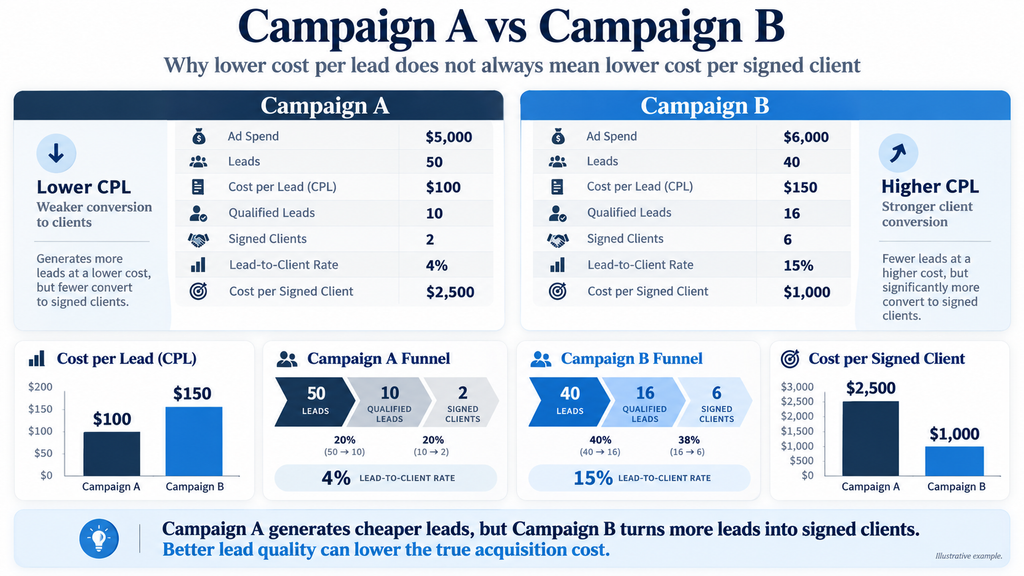
3. Cost Per Lead Is Not the Same as Cost Per Signed Client
Law firms should evaluate advertising economics beyond the first inquiry. Consider this illustrative calculation, not actual client performance:
| Metric | Campaign A | Campaign B |
|---|---|---|
| Google Ads spend | $6,000 | $6,000 |
| Total leads | 40 | 24 |
| Cost per lead | $150 | $250 |
| Qualified leads | 12 | 16 |
| Signed clients | 3 | 6 |
| Cost per signed client | $2,000 | $1,000 |
Based on cost per lead alone, Campaign A looks more efficient. However, Campaign B generates twice as many signed clients on the same budget. That is the difference between optimizing for lead volume and client acquisition. With CRM attribution, your firm can evaluate cost per qualified lead, consultation rate, signed client rate, and cost per signed client.
These metrics help you decide which campaigns deserve additional investment and which need changes to targeting, landing pages, or intake processes.
How to Track Google Ads Leads and Signed Clients in HubSpot?
The framework consists of seven connected stages. Each stage must preserve the information the next stage needs.
Step 1: Connect HubSpot and Google Ads Correctly
Start by connecting your Google Ads account through HubSpot’s Ads integration.
In HubSpot, navigate to Marketing > Ads and follow the account connection process.
Before connecting, verify the responsible person holds the necessary permissions on both platforms. HubSpot requires Ads publishing access and administrative access to the relevant Google Ads account. The connection delivers a foundation for campaign reporting, ad attribution, and CRM conversion events. However, connecting the platforms does not guarantee complete attribution.
At this stage, verify that:
- The correct Google Ads account is connected.
- The HubSpot tracking code is installed on the website.
- Google Ads auto-tagging is enabled.
- Landing pages retain click parameters.
- Form submissions create or update the correct contacts.
- Your Google Ads conversion goals are configured appropriately.
For firms operating several offices or advertising accounts, confirm which account owns the conversion actions.
Technical consideration: Avoid connecting everything through a manager account without reviewing the integration aspect requirements. Certain HubSpot enhanced conversion workflows have restrictions when configured through Google Ads manager accounts. If you need assistance setting up compliant attribution models across multi-office accounts, reach out to Agilitive Digital for specialized support.
Step 2: Capture GCLID and Advertising Attribution Data
When someone clicks an eligible Google ad, Google’s auto-tagging appends a Google Click Identifier, or GCLID, to the landing page URL. This identifier links the advertising interaction to a later conversion.
HubSpot includes a native contact property called Google ad click ID. According to HubSpot’s documentation, the property can be populated automatically from the Google click identifier. For additional reporting and troubleshooting, your firm may benefit from preserving more attribution fields.
Recommended properties include:
| Field | Purpose |
|---|---|
| gclid | Google Ads click identifier |
| gbraid | Google attribution identifier, where applicable |
| wbraid | Google attribution identifier, where applicable |
| utm_source | Marketing source |
| utm_medium | Marketing medium |
| utm_campaign | Campaign identifier |
| utm_content | Ad creative or content identifier |
| utm_term | Keyword or targeting identifier, when supplied |
| landing_page_url | Original landing page |
| lead_transaction_id | Unique identifier for the lead event |
These are suggested custom property names, not a claim that HubSpot creates all of them automatically. HubSpot also has native Original Traffic Source and Latest Traffic Source attributes that should remain part of the attribution framework.
Technical consideration: GCLIDs, GBRAIDs, and WBRAIDs are not interchangeable. Preserve whichever identifiers are available, and confirm that your chosen import method supports them. Never manufacture missing identifiers.
Step 3: Connect Website Forms and Phone Calls to HubSpot
A functioning Google Ads and HubSpot integration needs reliable lead capture. For website forms, Google Tag Manager manages marketing tags and event tracking, while HubSpot receives contact information and permitted attribution properties. Hidden form fields can capture attribution values without requiring visitors to enter them manually.
Forms embedded through iframes or third-party systems need special attention. A Google Tag Manager listener on the parent webpage may not detect successful submission of a cross-origin embedded form. The implementation may require supported form callbacks, postMessage events, native integration events, or server-side confirmation.
Avoid using button clicks as the primary measure of successful form submission because a visitor can click Submit without completing the form.
Phone inquiries need similar treatment. A call tracking provider such as CallRail can help connect tracked calls with source information and HubSpot contact records when the appropriate integration and identification data are available.
Technical consideration: Use a unique event identifier for each successful lead action. A contact may submit multiple inquiries, but you should not consider the same lead event multiple times.
Step 4: Build a Lead Qualification Framework in HubSpot
Capturing inquiries is only the beginning. Your intake team needs a consistent process to distinguish valuable cases from inquiries that do not meet your firm’s criteria.
Start by determining clear qualification standards with the managing attorney or intake manager. For a personal injury firm, qualification might consider jurisdiction, incident type, probable conflicts, and whether the matter falls within the firm’s accepted practice areas. For a family law firm, intake criteria may include geographic jurisdiction, service required, consultation eligibility, and the firm’s capacity to accept the matter.
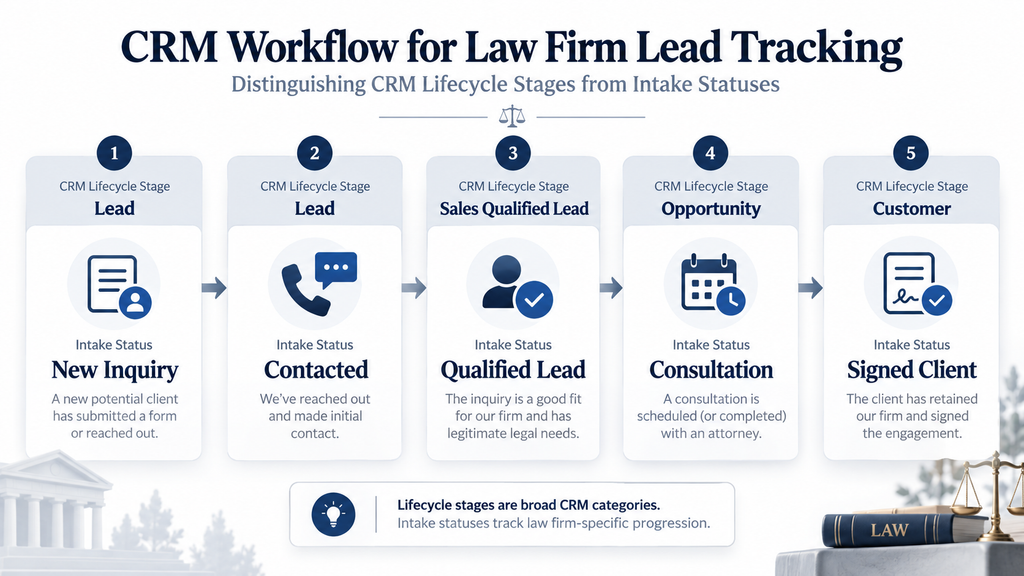
A practical HubSpot setup can combine lifecycle stages with dedicated intake properties.
| CRM Property | Suggested Values |
|---|---|
| Lead status | New, Attempted, Connected, Unqualified |
| Qualification status | Pending, Qualified, Disqualified |
| Consultation status | Not Scheduled, Scheduled, Completed, No Show |
| Intake outcome | Pending, Declined, Signed |
| Practice area | Family Law, Personal Injury, Criminal Defense, Other |
| Disqualification reason | Outside Jurisdiction, Service Not Offered, Conflict, Other |
| Client signed date | Date of executed engagement |
| Lead source | Original attributed channel |
Your property structure should reflect the firm’s intake workflow. HubSpot lifecycle stages represent broad relationship milestones, while custom properties provide legal intake details.
Technical consideration: Do not equate a HubSpot contact marked Customer with a newly signed legal matter. Existing clients can return with additional matters, so firms may need deal-level or matter-level tracking to count each engagement correctly.
Step 5: Connect Qualified Lead and Signed Client Events to Google Ads
Once your CRM identifies qualified inquiries and signed clients, you can configure offline conversion tracking. Google recommends enhanced conversions for leads, which supplements offline conversion information with processed first-party customer data to improve attribution.
There are two important implementation options:
Option A: HubSpot’s Native Google Ads Conversion Events
HubSpot supports lifecycle stage change events that can synchronize eligible CRM outcomes with Google Ads. You can configure the lifecycle stage, conversion value, data-sharing settings, and conversion action behavior. A qualified lead event may correspond to a suitable lifecycle stage.
A signed client event requires a clearly defined milestone. If signed status exists only in a deal property, determine how that event will be passed to Google Ads before assuming the native lifecycle integration covers it. HubSpot notes that lifecycle stage events generally synchronize qualifying stage changes occurring after the event is created.
Option B: Google Ads Data Manager or Another Supported Import Integration
For more advanced implementations, Google Ads Data Manager supports connections to external data sources, including HubSpot. This approach may be useful when your firm needs customized event mapping, data transformation, or conversion records beyond a basic lifecycle stage change.
2026 implementation note: Google updated its upgraded conversion configuration and Data Manager API requirements in 2026. New implementations must follow current Data Manager and enhanced conversions documentation rather than older Google Ads API tutorials. Whichever method you choose, keep event definitions, timestamps, identifiers, conversion values, and deduplication rules consistent.
Step 6: Configure Conversion Goals for Meaningful Optimization
Not every conversion bears equal importance. A law firm may track initial leads, qualified leads, consultations, and signed clients. However, asking Google Ads to optimize equally for every milestone can distort campaign performance.
Google Ads distinguishes primary and secondary conversion actions. Primary actions influence automated bidding when you use them. Secondary actions generally support observation and reporting, with exceptions for custom goals.
A pragmatic framework may look like this:
| Conversion Action | Initial Treatment | Purpose |
|---|---|---|
| Website form submission | Primary initially, if needed | Lead generation |
| Qualified lead | Primary after validation | Lead quality optimization |
| Consultation completed | Secondary | Intake performance |
| Signed client | Secondary initially | Client acquisition measurement |
| Phone call interaction | Depends on qualification setup | Call tracking |
These are suggested starting positions, not permanent requirements. A firm with consistent signed client volume and reliable values may optimize directly toward signed client conversions. A smaller firm with few signed cases may need to use qualified leads as its primary optimization signal until it accumulates enough reliable data.
Technical consideration: When moving from website leads to qualified CRM outcomes, avoid counting the same action through multiple integrations and conversion goals. Carefully review account-default goals, campaign-specific goals, and deduplication.
Step 7: Use CRM Outcomes to Improve Google Ads Campaigns
Once attribution and conversion imports run reliably, use the information to improve campaign decisions.
Compare advertising performance at three levels:
Lead generation: Which campaigns and search terms generate inquiries?
Lead qualification: Which campaigns produce inquiries that satisfy your intake criteria?
Client acquisition: Which campaigns contribute to signed engagements, and at what cost?
These differences reveal opportunities ordinary conversion reports miss. A campaign with an attractive cost per lead may generate many unqualified inquiries. Another campaign with fewer initial conversions may produce more consultations and signed clients.
At Agilitive Digital, we recommend combining Google Ads performance data with CRM qualification and intake outcomes before major allocation decisions. Review the complete lead journey along with search term reports, practice area performance, geographic targeting, landing pages, and conversion quality.
Technical consideration: Audit import diagnostics and match quality before trusting results. Successfully sending data does not guarantee every record matches an eligible Google Ads interaction. Also account for reporting delays and attribution differences between HubSpot and Google Ads.
Common Mistakes Law Firms Make With HubSpot and Google Ads
Mistake 1: Counting Every Form Submission as a Qualified Lead
Many law firms start with simple conversion tracking that records every successful form submission. This measures website activity but becomes misleading when the firm treats every inquiry as a prospective client with an acceptable legal matter.
Spam, referrals, inquiries outside the firm’s jurisdiction, and requests for unavailable services inflate reported lead volume. The result is a campaign report that rewards quantity without showing if the firm attracts the right prospects.
How to avoid it: Track successful submissions separately from qualified inquiries. Create clear qualification criteria, record disqualification reasons in HubSpot, and implement law firm conversion rate optimization strategies to route offline CRM milestones back into your ad account.
Mistake 2: Losing the Google Click Identifier Before the Form Is Submitted
A visitor may arrive through a Google ad, navigate to another page, and submit a form later. If the website doesn’t preserve the necessary attribution information, the final HubSpot record may lack a usable click identifier. Redirects, cookie restrictions, embedded forms, and disconnected booking systems create additional attribution gaps.
The firm still receives the inquiry, but it could struggle to connect it to the original advertising interaction.
How to avoid it: Test the full journey from ad landing pages through final submission. Inspect HubSpot’s native Google ad click ID property and custom attribution properties. Preserve identifiers where appropriate and permitted, and test the actual published form rather than relying on tag previews.
Mistake 3: Using HubSpot Lifecycle Stages Without Defined Intake Rules
HubSpot offers standard lifecycle stages, but they don’t automatically reflect how a law firm qualifies prospects or signs clients. If intake employees use different criteria to mark contacts as qualified, CRM reports become inconsistent. The problem worsens when lifecycle changes feed conversion data into Google Ads. Moving a contact to the wrong stage can create an inaccurate conversion signal.
How to avoid it: Document each stage’s definition and ownership. Use required intake fields where appropriate, train the intake team, and validate the conditions that trigger conversion events.
Mistake 4: Importing the Same Conversion Through Multiple Systems
A common tracking problem occurs when several integrations report the same action. A firm might track a form submission through Google Tag Manager, import the same event through GA4, and create another conversion through HubSpot.
Without proper event mapping and deduplication, Google Ads reporting can overstate performance. Conversion totals may encourage higher spending based on incorrect information.
How to avoid it: Maintain a conversion action inventory documenting each event, its collection method, source, and optimization status. Use consistent transaction identifiers when supported and test every import path.
Mistake 5: Moving to Signed Client Bidding Before the Data Is Reliable
Signed client conversions are valuable but often occur less frequently than initial leads. A firm may sign only a limited number of cases each month or have long delays between inquiries and engagement agreements.
If the firm changes its bidding strategy before CRM data is reliable, automated optimization may receive too few usable signals. The problem worsens when intake records are incomplete or conversion events arrive inconsistently.
How to avoid it: Begin by validating qualified lead data. Track signed client outcomes separately, review import diagnostics, and gradually adjust primary conversion goals as conversion volume and data quality support the change.
Mistake 6: Sending Sensitive Legal Information to Advertising Platforms
Legal CRM records can contain information requiring special care, including details about prospective representation, confidential communications, and sensitive legal matters. Connecting HubSpot to Google Ads does not mean every CRM property should become advertising data.
Hashing an email address also does not eliminate legal privacy or confidentiality obligations. In the United States, ABA Model Rule 1.6 addresses confidentiality, and applicable state rules may impose additional requirements. Canadian firms must consider applicable federal or provincial privacy laws and professional obligations.
How to avoid it: Work with legal counsel to establish approved data-sharing practices. Send only identifiers and conversion information that are necessary, supported, authorized, and permitted. Do not send case narratives, privileged communications, diagnoses, allegations, or unnecessary matter details to advertising platforms.
Recommended Implementation Sequence
Week 1: Audit existing Google Ads conversion actions, HubSpot account, tracking code, forms, and call attribution. Document which identifiers and lead outcomes are available.
Week 2: Implement missing attribution fields, validate form and call tracking, and agree on qualification rules with the firm’s intake manager.
Week 3: Configure approved CRM conversion events, test imports, validate timestamps and identifiers, and review conversion diagnostics.
Week 4: Reconcile initial reporting between HubSpot and Google Ads. Keep the existing bidding strategy stable until the new conversion signals are sufficiently reliable.
Continue reviewing imports and conversion quality after launch. Four weeks is an implementation checkpoint, not a guarantee that enough reliable data exists to change bidding.
Frequently Asked Questions
How Much Does Google Ads and HubSpot Integration Cost?
Costs depend on your HubSpot plan, tracking requirements, and implementation difficulty. While HubSpot offers native Google Ads integration, advanced conversion tracking and automation may require paid features, third-party tools, or additional setup costs.
How Long Does It Take to Track Signed Clients in HubSpot?
A basic integration typically takes one to two weeks if tracking and CRM properties are already configured. Advanced setups involving call tracking, custom workflows, and offline conversions may take longer, depending on complexity.
Is GCLID Tracking Enough for Law Firm Attribution?
No. GCLID connects eligible Google Ads clicks to conversions, but your firm also needs CRM data to identify qualified leads and signed clients. Combining click identifiers with HubSpot intake and lifecycle data provides better attribution.
What Is the Difference Between HubSpot Conversion Tracking and Google Ads Conversion Tracking?
Google Ads tracks advertising conversions, while HubSpot tracks leads throughout the client intake process. Connecting both lets your firm send qualified leads and signed-client outcomes back to Google Ads for better reporting and optimization.
Can Law Firms Legally Share CRM Conversion Data With Google Ads?
Yes, when permitted by pertinent privacy laws, professional conduct rules, and Google’s data policies. Law firms must meet relevant consent and confidentiality requirements and avoid sharing sensitive or privileged client information.
Conclusion
Tracking leads is necessary, but it is not the same as understanding which advertising campaigns generate clients. A reliable Google Ads and HubSpot integration should accomplish three things.
First, it must preserve attribution information that links advertising interactions to contact records. Without reliable click identifiers and campaign data, your firm may struggle to identify where qualified inquiries originated.
Second, it must establish consistent lead qualification and intake processes. Google Ads cannot distinguish a valuable prospective client from an irrelevant inquiry unless your tracking and CRM systems deliver meaningful information.
Third, it should connect verified CRM outcomes to Google Ads so your campaigns can increasingly optimize toward the results that matter to your business.
At Agilitive Digital, we focus exclusively on law firms. With over $10 million in managed ad spend and a 97.5% client retention rate, we combine Google Ads management, advanced conversion tracking, and CRM integration to help firms evaluate marketing performance beyond lead volume.
Want to know which Google Ads campaigns are actually adding to signed clients?
Request a Free Google Ads Audit from Agilitive Digital. We’ll review your conversion tracking, CRM attribution, and ad setup to identify gaps that prevent you from accurately measuring qualified leads and signed cases.